Advanced Deployment Strategies
TL;DR: Learn industry-standard deployment patterns that let you roll out AI system updates safely, test new versions without user impact, and minimize risks when deploying to production.
Imagine you've trained a new version of your AI model that should be faster and more accurate. You're excited to deploy it to production and let your users benefit from the improvements. But what if the new version has an unexpected bug? What if it performs worse on certain types of inputs you didn't test? What if the "faster" model actually uses more memory and crashes under load?
Simply replacing your old system with the new one is risky. In July 2024, a routine software update from cybersecurity firm CrowdStrike caused widespread system crashes, grounding flights and disrupting hospitals worldwide. While AI deployments might not have such dramatic impacts, pushing an untested model update to all users simultaneously can lead to degraded user experience, complete service outages, or lost trust if users encounter errors.

This is where deployment strategies come in. These are industry-proven patterns that major tech companies use to update their systems safely. They let you roll out updates gradually to minimize impact, test new versions without affecting real users, compare performance between versions, and switch back quickly if something goes wrong.
Throughout this course, we've built up the knowledge to deploy AI systems professionally, from understanding APIs to deploying to the cloud to ensuring reliability. These deployment strategies represent the final piece of how companies keep their services running smoothly while continuously improving them.
Let's explore four fundamental deployment patterns that you can use when updating your AI systems.
The Four Deployment Strategies
Blue-Green Deployment
Blue-green deployment is like having two identical stages at a concert venue. While one stage hosts the live performance, the other sits ready backstage. When it's time to switch acts, you simply rotate the stages. If anything goes wrong with the new act, you can instantly rotate back to the previous one.
In a blue-green deployment, you maintain two identical production environments called "blue" and "green." At any time, only one is live and serving user traffic. When you want to deploy a new version of your AI system, you deploy it to the idle environment, test it thoroughly, and then switch all traffic to that environment in one instant cutover. The switch is typically done by updating your load balancer or DNS settings to point to the new environment.
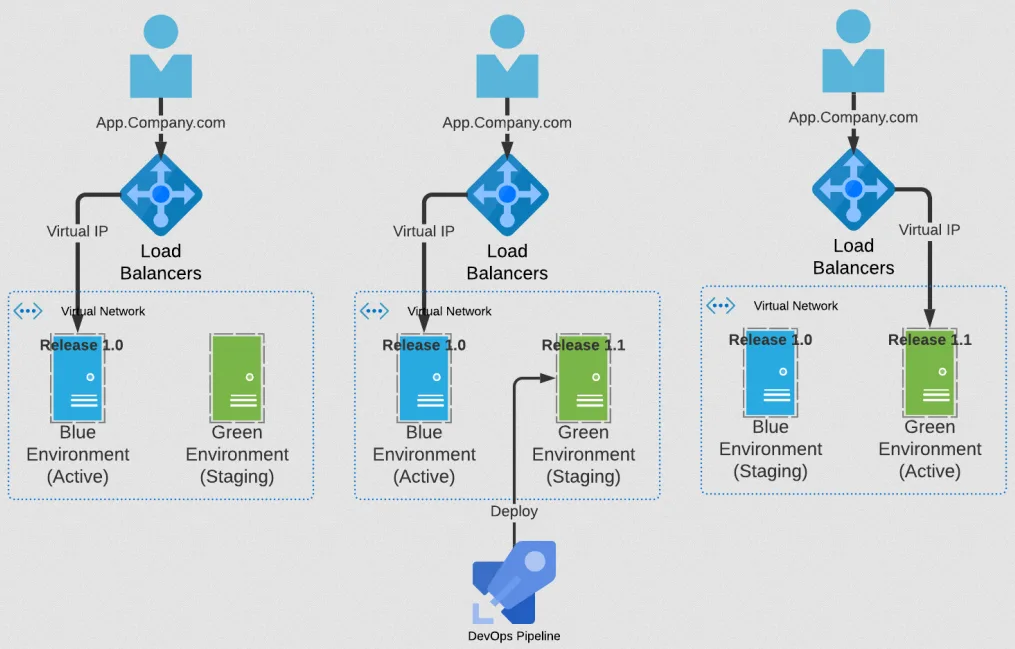
Suppose your blue environment is currently serving users with version 1.0 of your AI model. You deploy version 2.0 to the green environment and run tests to verify everything works correctly. Once you're confident, you update your load balancer to route all traffic to green. Now green is live and blue sits idle. If users report issues with version 2.0, you can immediately switch traffic back to blue. The entire rollback takes seconds.
The main advantage of blue-green deployment is the instant rollback capability. Because the old version remains fully deployed and ready, you can switch back the moment something goes wrong. This also gives you a clean, predictable deployment process with minimal downtime during the switch.
The downside is cost and resource requirements. You need to maintain two complete production environments, effectively doubling your infrastructure. You also need a sophisticated routing mechanism to handle the traffic switch cleanly. For these reasons, blue-green deployment works best when you need maximum reliability and can afford the infrastructure overhead, or when your deployment is small enough that duplicating it is inexpensive.
Canary Deployment
The term "canary deployment" comes from the old coal mining practice of bringing canary birds into mines. These birds were more sensitive to toxic gases than humans, so if the canary showed distress, miners knew to evacuate. In software deployment, the canary is a small group of users who receive the new version first. If they encounter problems, you know to stop the rollout before it affects everyone.
In a canary deployment, you gradually roll out a new version to an increasing percentage of users. You might start by routing 5% of traffic to the new version while 95% continues using the old version. You monitor the canary group closely for errors, performance issues, or user complaints. If everything looks good, you increase the percentage to 25%, then 50%, then 100%. If problems emerge at any stage, you can halt the rollout and route all traffic back to the old version.
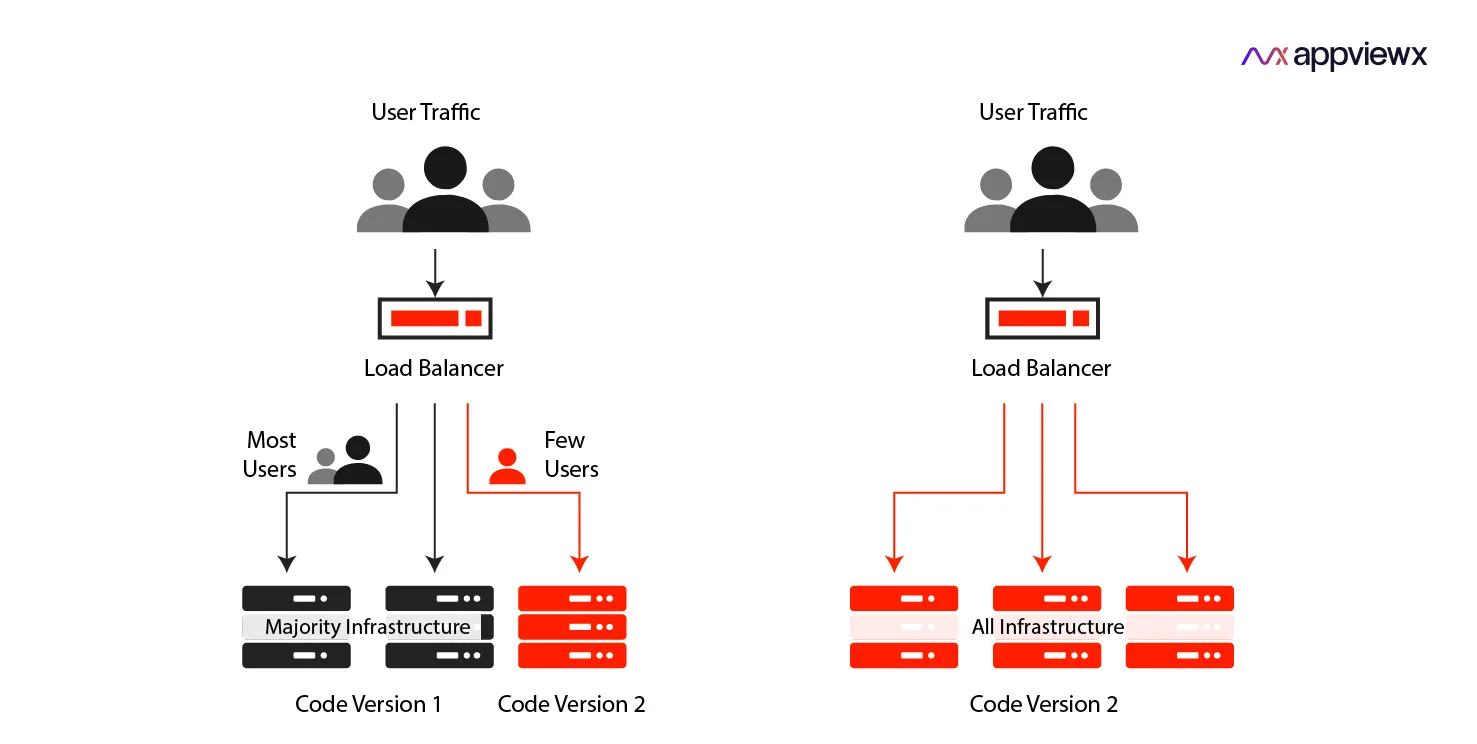
Imagine you've deployed a new AI model that you believe is more accurate. You configure your load balancer to send 10% of requests to the new model while the rest go to the old model. Over the next few hours, you monitor response times, error rates, and user feedback from the canary group. The new model performs well, so you increase to 50%. After another day of monitoring shows no issues, you complete the rollout to 100% of users.
The main advantage of canary deployment is risk reduction through gradual exposure. If your new version has bugs or performance issues, only a small fraction of users encounter them. You catch problems early when the blast radius is small, rather than impacting your entire user base at once. This approach also lets you monitor real-world performance under actual production load, which is more reliable than synthetic testing.
The challenge with canary deployment is that it requires good monitoring and metrics to detect problems quickly. You need to track error rates, performance, and user experience for both the canary and stable groups. The gradual rollout also takes time, which might not be suitable if you need to deploy an urgent fix. Additionally, some users will experience the new version while others won't, which can complicate support and debugging if users report different behaviors.
Shadow Deployment
Shadow deployment is like a dress rehearsal for a theater production. The actors perform the entire show with full lighting, props, and costumes, but the audience seats remain empty. This lets the production team find problems and check timing without any risk to the actual performance. Similarly, shadow deployment runs your new version in production with real traffic, but the results are never shown to users.
In a shadow deployment, you deploy the new version alongside your current production system. Every request that comes to your system gets processed by both versions. Users receive responses only from the stable version, while responses from the new version are logged and analyzed but never used. This lets you test how the new version behaves under real production load and compare its performance to the current version without any user impact.
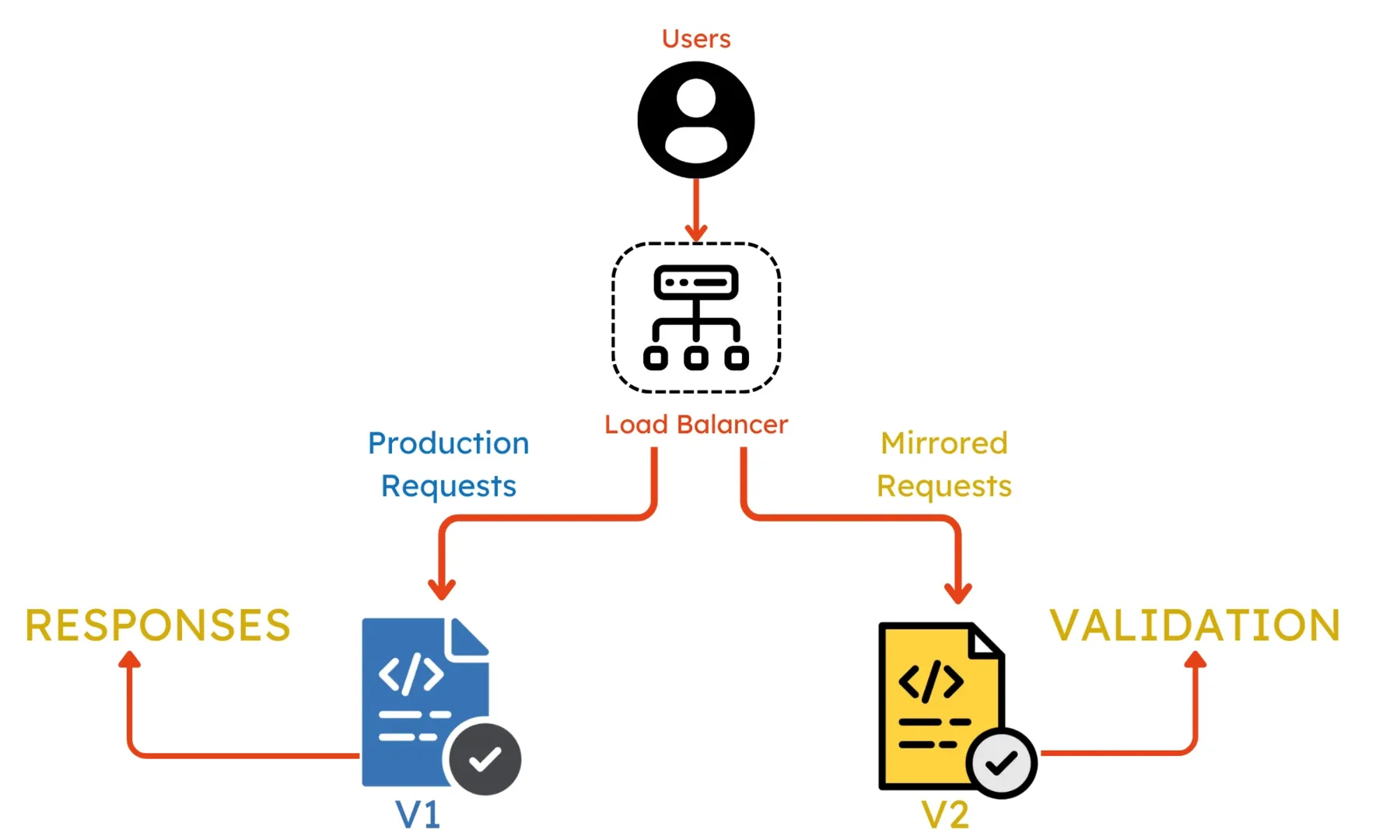
Suppose you've built a new AI model and want to check it produces better results before showing it to users. You deploy it in shadow mode, where every user request gets sent to both the old model and the new model. Users see only the old model's responses. Meanwhile, you collect data comparing response times, resource usage, and output quality between the two models. After a week of shadow testing shows the new model is faster and more accurate, you confidently move it to production.
The main advantage of shadow deployment is zero user risk. Since users never see the new version's output, bugs or poor performance have no impact on user experience. You get to test with real production traffic patterns rather than fake tests, which reveals issues that might not appear in staging environments. This also gives you detailed performance metrics for comparison before making the switch.
The downside is infrastructure cost and complexity. You're running two complete systems and processing every request twice, which doubles your compute costs during the shadow period. You also need advanced infrastructure to copy traffic and collect comparison metrics. Shadow deployment is most useful when you need high confidence before switching to a new version, such as testing a very different AI model architecture or checking performance improvements before a major update.
A/B Testing
A/B testing is like a taste test between two recipes. Instead of asking which recipe people think they'll prefer, you give half your customers recipe A and the other half recipe B, then measure which group comes back more often or spends more money. The data tells you which recipe actually performs better, not just which one sounds better on paper.
In A/B testing deployment, you run two versions of your system side by side and split users between them. Unlike canary deployment where the goal is to gradually roll out a new version safely, A/B testing aims to compare performance between versions to make data-driven decisions. You might run both versions at 50/50 for weeks or months, collecting metrics on user satisfaction, response quality, speed, or business outcomes. The version that performs better according to your chosen metrics becomes the winner.
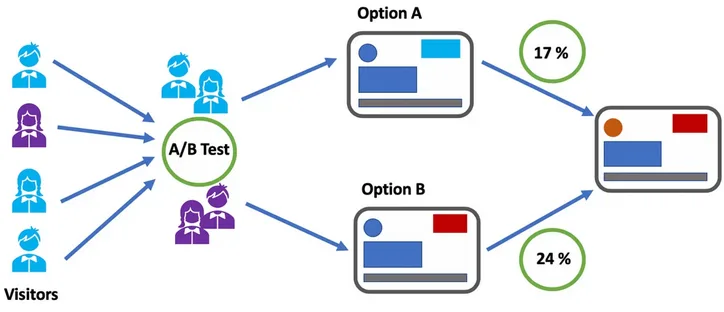
Suppose you have two AI models: model A is faster but slightly less accurate, while model B is more accurate but slower. You're not sure which one will provide better user experience. You deploy both models and randomly assign 50% of users to each. Over the next month, you track metrics like user satisfaction ratings, task completion rates, and how often users retry their requests. The data shows that users with model B complete tasks more successfully and rate their experience higher, even though responses take a bit longer. Based on this evidence, you choose model B as the primary model.
The main advantage of A/B testing is that it removes guesswork from deployment decisions. Instead of assuming one version is better, you measure actual user behavior and outcomes. This is especially valuable when you're making tradeoffs, like speed versus accuracy, or when you've made changes that should improve the user experience but you're not certain. The statistical approach gives you confidence that observed differences are real and not just random chance.
The challenge with A/B testing is that it requires careful planning and longer timelines. You need to define what metrics matter, determine how much data you need for reliable results, and run the test long enough to reach statistical significance. You also need infrastructure to split traffic reliably and track metrics for each group separately. Some users will get the worse version during the test period, which is an acceptable tradeoff when you're trying to learn which version is actually better. A/B testing works best when you're comparing similar versions or incremental improvements, not when one version is clearly experimental or risky.
Choosing Your Strategy
Which strategy should you use? It depends on your situation. Blue-green works when you need instant rollback and can afford duplicate infrastructure. Canary is the most common choice for routine updates, balancing safety with cost. Shadow deployment gives you zero-risk testing when validating major changes. A/B testing helps when you need data to choose between competing versions.
These strategies often work better together. A common pattern is to start with shadow deployment to validate your new version works correctly, then move to canary deployment for gradual rollout, all within blue-green infrastructure for instant rollback if needed. You might use A/B testing during the canary phase to gather comparison data between versions.
The key is matching the strategy to your needs based on how risky the change is, what infrastructure you can afford, and how much confidence you need before fully committing to the new version.