API Fundamentals
Interactions are common in both human society and the digital world. We as humans interact with each other through language to communicate our thoughts and purposes. In the digital world, a food delivery application interacts with restaurants to process your order and interacts with banks to ensure payment for the meal. Interactions between applications (AI or not) are what build the digital world we cannot live without. But how do applications interact with each other? In the Introduction to Part A, we mentioned that there is a standardized method for streamlined interaction between applications, and that method is what we call Application Programming Interfaces (APIs). If applications need to communicate like humans do but face barriers like different programming languages and different deployment infrastructure, APIs are like having a universal post office that knows where everyone lives and how they prefer to receive and send messages.
APIs are how most of the existing AI systems handle interactions with other types of programs. For a real-world example, ChatGPT can be accessed through OpenAI's official website, their mobile/desktop apps, other AI-based applications (such as Perplexity), Python scripts, or even command line scripts, all through the same family of APIs OpenAI has published. OpenAI itself also does not have to write any specific code for a certain type of program to interact with their APIs. They only have to standardize their APIs, and as long as other programs speak the same language, i.e., adhere to their API standard, the interactions should work.
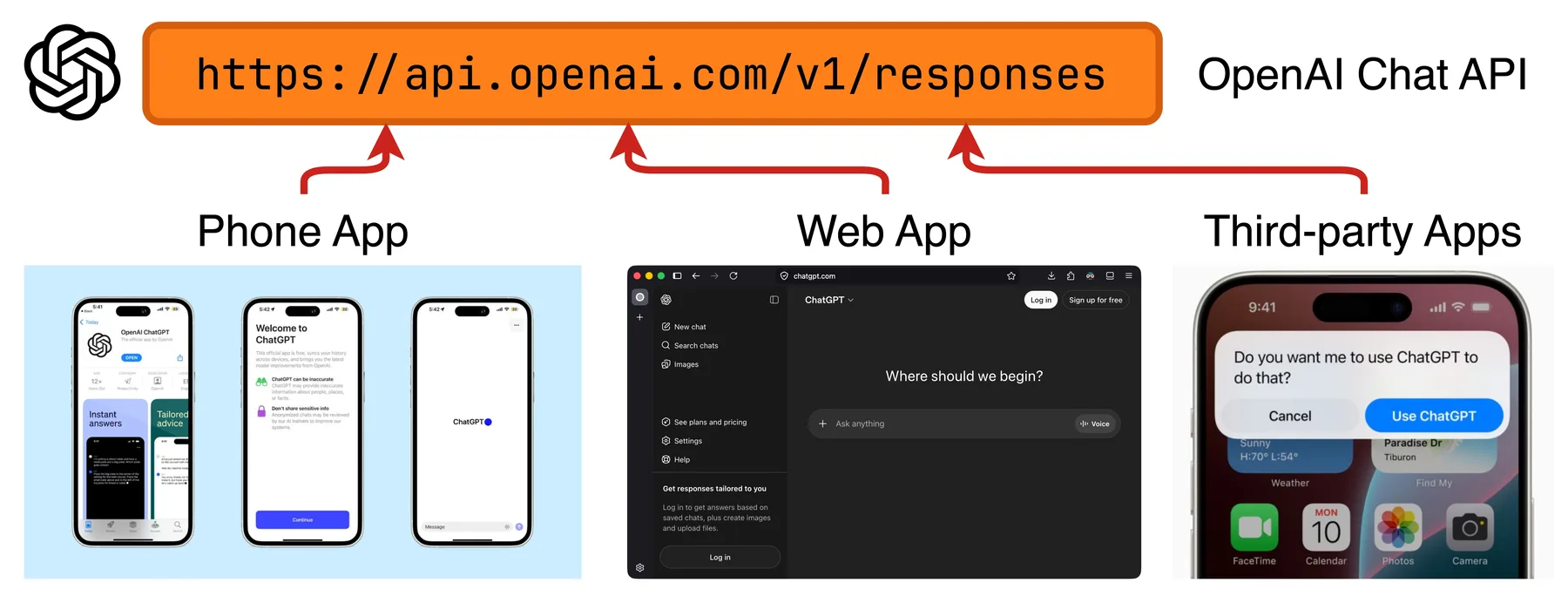
Various types of programs interact with ChatGPT through OpenAI's family of APIs.
In this module, we will cover fundamental concepts for understanding and using APIs. We will also get to interact with an existing AI system's family of APIs to gain hands-on experience with how APIs work in practice.
Network Fundamentals
Let's think about how humans communicate through letters. When we send a letter to one of our friends, we first need to know where to send the letter, and that's usually done through a geographical address system. We will write the recipient's home address on the letter, which corresponds to a physical location, and the post office will route the letter to that location. When applications communicate through APIs, it is usually done through the computer network, also with an address system that works on the network. Conceptually it is similar. Since applications and their corresponding APIs usually live at different locations of the network, each communication needs to specify a network address to reach the recipient. Without going too deep into computer networking, we will focus on four core concepts: IP addresses, domains, URLs, and ports.
An IP address is a unique identifier assigned to each device connected to a network, telling applications where to find each other. Think of it as a street address such as Fredrik Bajers Vej 7K, 9220 Aalborg East, Denmark. An IPv4 address looks something like 65.108.210.169.
Technically speaking, APIs can be reached solely by IP addresses. The problem is that IP addresses are difficult for humans to read and remember, just like street addresses are usually too long for us to remember.
We usually prefer a shorter, semantically rich name like Aalborg University. Similarly, domain names provide this alternative that is easier for humans.
A domain is also a unique identifier pointing to some network resource and usually has one or more corresponding IP addresses.
In the ChatGPT example above, api.openai.com is the domain name of the API, pointing to IP addresses like 162.159.140.245 and 172.66.0.243.
A URL always contains a domain but also adds the protocol that specifies how the communication should happen (such as HTTP, which we will discuss later), along with a path that narrows down to a specific resource or function hosted under that domain.
An example URL is https://api.openai.com/v1/responses, which specifies the communication protocol (https), the domain name (api.openai.com), the version of the API (v1), and the specific function (generating model responses).
Think of the domain name api.openai.com as the building address like Fredrik Bajers Vej 7K that usually corresponds to a certain group of hardware resources. The full URL is like an address with a floor and room number, such as Fredrik Bajers Vej 7K, 3.2.50, with a specified delivery company (like PostNord).
Finally, we have ports. Just as some people run several businesses in the same location and have multiple corresponding mailboxes, computers run multiple applications simultaneously. A port is used to identify which specific application should receive the incoming message, and each IP address can have up to 65,535 ports. Typically we don't have to specify a port when calling an API, since there are default ports assigned to certain services, protocols, and applications. For example, HTTPS-based APIs usually run on port 443.
Below are some videos explaining computer network concepts to aid your study.
- IP address explained (video) by George Nisbet, a short conceptual walkthrough
- Network ports explained (video) by CBT Nuggets, a clear explainer in the style of IT training
- Understanding URLs (video) by LearnFree, a slow-paced introduction for beginners
We also skipped more advanced computer networking concepts, like the OSI model of computer networks, and how computers process network addresses. But if you are interested in digging deeper, below are links for extended study:
- The OSI model of computer networks (blog post) by GeeksforGeeks, a detailed walkthrough of all seven layers with examples
- The OSI model explained (video) by Fireship, a dense, fast-paced 100-second overview of computer networking
- How domains are mapped to IP addresses (video) by PowerCert Animated Videos, an animated explainer of how DNS resolves domains
HTTP Protocol
We mentioned above that a URL will specify a protocol, i.e., how the communication should happen. When you send a letter in the real world, you need to first choose from available postal services, such as PostNord and DAO. Then you will pick a specific delivery method provided by the postal service company of your choice, like standard delivery or express delivery. A protocol and the specific method within that protocol are conceptually similar to a postal service and a delivery method, respectively.
When you choose postal services, you have some flexibility, and you will usually choose based on price, delivery time, previous experiences, etc. For APIs, you might also get to decide which protocol to use based on your specific needs. For now, we will focus on the one protocol used in most APIs called HTTP (HyperText Transfer Protocol).
HTTP follows the request-response model. That means an HTTP-based communication will always start with a sender application sending an HTTP request to a recipient. After the recipient receives and processes the request, it will send an HTTP response back to the sender, and the communication ends there.
HTTP Request
On top of the request-response model, the HTTP protocol standardizes how a request should be formatted, similar to a standard in real life for how a letter should be addressed and sealed. This standard is in the form of several HTTP request components: request line, request headers, and request body.
The request line is a single line that summarizes the intent of the request: what action the sender wants to perform, where to perform it, and which version of the protocol to use. It is similar to the first line on the front of a letter that states the purpose and destination, such as Delivery - Fredrik Bajers Vej 7K, 3.2.50. A request line will be something like this:
POST https://api.openai.com/v1/responses HTTP/1.1It is divided into three parts by spaces.
The first part is the HTTP request method. Different methods correspond to different purposes of the request, and also mean the sender expects different behavior from the recipient.
Two methods that you will frequently encounter when using AI service APIs are GET and POST.
GET means the sender wants to retrieve information, for example, checking OpenAI's available AI models by sending a GET request to https://api.openai.com/v1/models. It is similar to sending an inquiry letter to your landlord asking for information.
POST is for sending data and expecting a response corresponding to that data. This will be the primary method we use to send data to AI services and retrieve their response. It is similar to sending a blueprint to a manufacturer expecting them to send a prototype back to you.
The second part is the URL of the recipient API, and the third part is the protocol version, which we can leave at the default in most cases, similar to the port.
The request headers are a set of key-value pairs that carry metadata about the request, such as who is sending it, what format the data is in, and what the sender expects back. They do not contain the main content of the request, but provide additional context that helps the recipient understand how to handle it. Think of them as the information you write on the envelope of a letter, not the letter itself, but essential details for proper delivery and processing. A typical set of request headers will be something like this:
Authorization: Bearer sk-abc1234567890qwerty
Content-Type: application/json
Accept: application/json
User-Agent: SomeAIApp/1.0
Here, Authorization identifies the user and protects the API. This is usually where we specify our API keys. Content-Type and Accept specify the format of data we're sending and the expected response, respectively. User-Agent identifies the type of application or client we are using to interact with the API.
While there are some common header fields you will frequently encounter in practice, there is not really a standardized list of header fields that will always be included in any HTTP request. What fields to include in each HTTP request largely depends on what the specific API we are trying to communicate with requires, which we will see when we start to interact with real APIs.
Finally, we have the request body, which is the content of the request. There are various data formats to use for the body. In the above example, notice that we specified the content format in one request header as Content-Type: application/json, which means we will be using the JSON format in the request body. In other words, our request body will look like this:
{
    "model": "gpt-5.5",
    "input": [
        {"role": "user", "content": "Write a haiku about APIs"}
    ],
    "temperature": 0.7,
    "max_output_tokens": 50
}
The key-value format of the JSON object is specific to the API we are sending our request to. In practice, when we are sending a request to an existing API served by an AI system provider, like OpenAI with one of their APIs, we will need to read their documentation for the specification of the expected format. There are also other content types that might be more suitable for certain types of data. Generally speaking, JSON is the most popular one since it's both parseable by machines and friendly to humans.
Also recall that of the two HTTP methods GET and POST, we will be sending data to the recipient when using POST but not when using GET. Thus, we will not include the request body in a GET request.
HTTP Response
After we send the letter (HTTP request) to the recipient, under the request-response model of HTTP, we expect a response letter (HTTP response) from the recipient. Similar to real life, if everything is working correctly, you will receive a response letter from the actual recipient. If not, the postal service will also let you know what's wrong in their response letter. Similar to the HTTP request, an HTTP response is composed of three components: status line, response headers, and response body.
The status line is a single line that summarizes the outcome of your request: whether it succeeded, failed, or requires further action. Think of it as the first thing you see when you open a response letter, which is a brief verdict like "Your request has been processed successfully" or "We could not find the information you requested". A status line looks like this:
HTTP/1.1 200 OKIt is composed of three parts: HTTP protocol version, status code, and reason phrase. Both status code and reason phrase provide immediate information about the outcome of your request, and they correspond one-to-one.
The response headers are, similar to request headers, a set of key-value pairs that carry metadata, but this time about the response rather than the request. They tell you things like the format of the returned data and the size of the response. A typical set of response headers might look something like this:
Content-Type: application/json
Content-Length: 1247
The key-value pairs expected to be included in a response depend on the specific API you requested.
The response body contains the actual data the API provider sends back to you, i.e., the main content of the response letter. This is where you will find the information you requested or the result produced from the data you sent. Just like the request body, its format is specified by the corresponding header (Content-Type). A response body from the ChatGPT API in JSON format will look like this:
{
  "id": "resp_6820f382ee1c8191bc096bee70894d04",
  "object": "response",
  "created_at": 1746989954,
  "model": "gpt-5.5",
  "status": "completed",
  "output": [
    {
      "id": "msg_67cb3252cfac8190865744873aada79",
      "type": "message",
      "role": "assistant",
      "content": [
        {
          "type": "output_text",
          "text": "Endpoints whisper soft / data flows on silent threads / answers softly bloom"
        }
      ]
    }
  ],
  "output_text": "Endpoints whisper soft / data flows on silent threads / answers softly bloom",
  "usage": {
    "input_tokens": 12,
    "output_tokens": 18,
    "total_tokens": 30
  }
}
Again, the format of this JSON object is specific to the API you requested.
Below are some videos explaining HTTP to aid your study.
- HTTP explained (video) by Connected Cookie, a quick 3-minute primer
- HTTP request explained (video) by Kinsta, a short explainer on the structure of HTTP requests
You might have noticed that most modern APIs state
httpsas the protocol in their URLs, but we have been discussing the HTTP protocol throughout the section. So where is the "s" part? Just as a brief spoiler, HTTPS is an extension of HTTP that additionally encrypts messages. Think of it as writing letters in a way that only you and the recipient can understand. We will come back to HTTP and HTTPS when we discuss serving our own APIs to the world over the internet in a later module Cloud Deployment, since the importance of HTTPS will be much more relatable in that context.While HTTP is the predominant API protocol, it is not the only one, and there are other protocols that can achieve different functionalities or are more suitable than HTTP in certain scenarios. For example, WebSocket is a protocol that, instead of using the request-response model like HTTP does, establishes a continuous, bidirectional (full-duplex) communication tunnel between two applications. It is widely used in video conferencing platforms, and by some AI systems like OpenAI's Realtime API and Google's Gemini Live. You can learn more about alternative protocols to HTTP that are relevant in the AI context if you are interested:
- WebSocket Protocol (blog post) by GeeksforGeeks, a comparison between WebSocket and HTTP friendly to beginners
- WebRTC Protocol (blog post), another protocol for full-duplex communication
- Model Context Protocol (MCP) (docs), which streamlines interaction between AI chat models and external tools. I think calling it a protocol is questionable, since it uses HTTP internally. Nonetheless, it is very relevant in the context of AI
- Message Queuing Telemetry Transport (MQTT) Protocol (blog post), a protocol that operates on the publish-subscribe pattern, suitable for efficiently distributing data to lots of applications at once
Interact with HTTP APIs
With the above fundamental concepts established, we have most of the knowledge needed to interact with existing APIs in practice.
Interact with APIs in Browsers
You might not have realized it, but you've been interacting with APIs all the time while reading this blog post. When you visit one page of my blog site, your browser is sending an HTTP request with a request line and request headers that look like the following:
GET https://blog.yanlincs.com/ai-system/api-fundamentals/ HTTP/1.1

User-Agent: Mozilla/5.0 (X11; Linux x86_64; rv:149.0) Gecko/20100101 Firefox/149.0
Accept: text/html,application/xhtml+xml,application/xml;q=0.9,*/*;q=0.8
Accept-Language: en-US,en;q=0.9
Accept-Encoding: gzip, deflate, br, zstd
Referer: https://blog.yanlincs.com/ai-system/
Connection: keep-alive
This request is received by the API of my blog site, and it returns the HTTP response that looks like the following. This response is then rendered into a web page by your browser.
HTTP/1.1 200 OK

Content-Type: text/html
Content-Length: 38678

<!DOCTYPE html>
<html lang="en">
<head>
    <meta charset="utf-8">
    <meta name="viewport" content="width=device-width, initial-scale=1">
    <title>API Fundamentals - Yan Lin's Blog</title>
    <meta name="author" content="Yan Lin">
<!-- remaining response body -->
You can interact with other APIs that accept GET requests in the same way, even for APIs that are not supposed to be rendered as a web page. Just access the URL of the API you want to interact with in your browser.
For example, if we go to the root URL of GitHub APIs (https://api.github.com/) in our browser, the response will be displayed as raw HTTP response components.
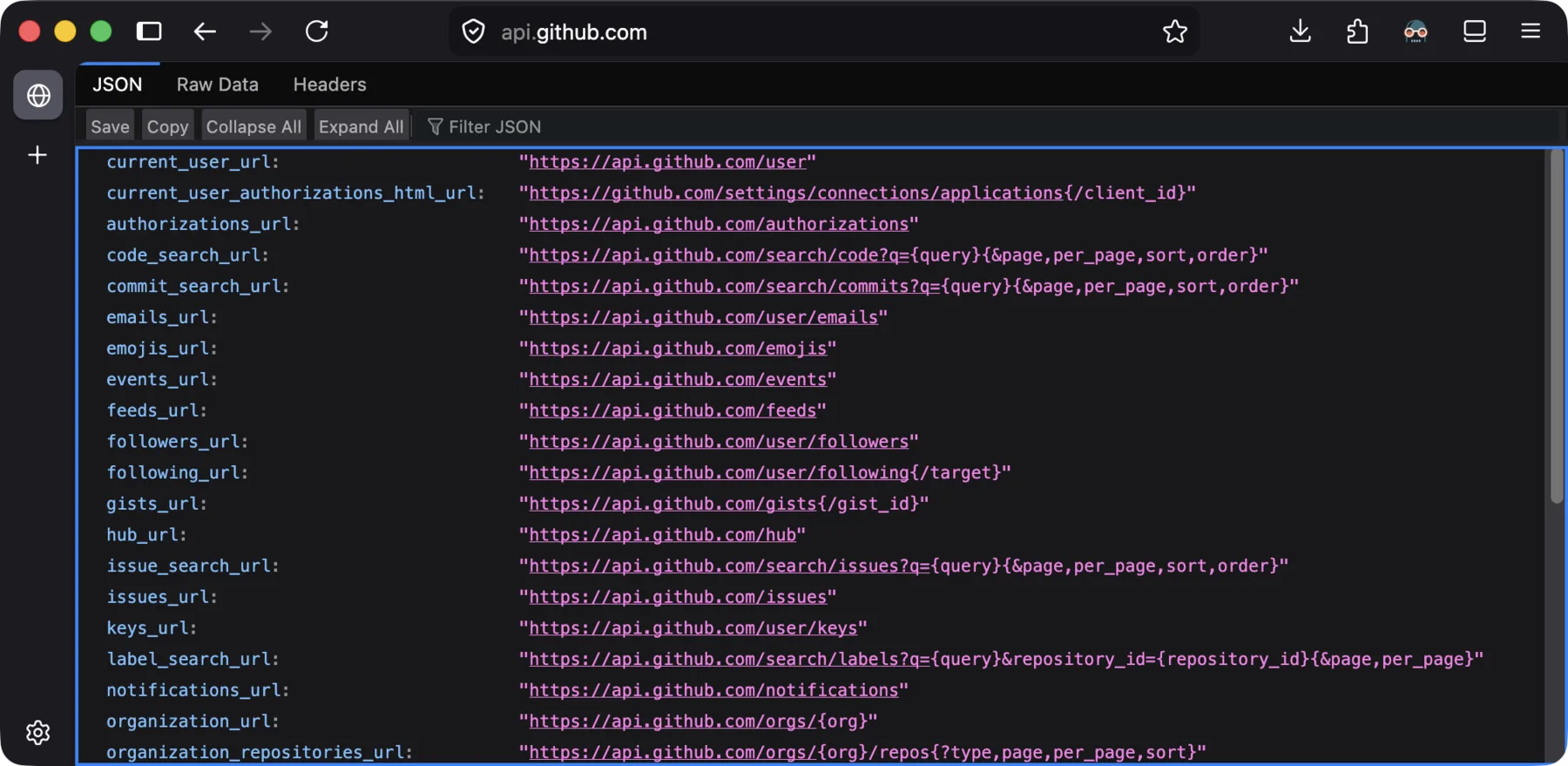
A response sent back by GitHub APIs in a browser.
Nevertheless, you can tell that browsers are not an ideal tool for interacting with and testing APIs.
Aside from the fact that browsers are not built to test APIs in the first place, there are also several limitations with this method of interaction.
You cannot send POST requests to APIs that accept them, since there is no place for you to enter the request body. You also cannot interact with APIs that require API key authentication (which is very common for AI systems), since there is no place for you to control the request headers (where you would put your API keys).
API Testing Tools
This is where HTTP API testing tools come in. They are dedicated development tools for testing HTTP APIs. They let us control every detail of an HTTP API interaction, and get a better idea of the behavior of HTTP APIs.
There are lots of API testing tools on the market. Here I will use Postman as an example, which is the most widely used and intuitive one.
To begin, let's send a GET request to GitHub APIs just like we did above, but this time with Postman. Right away, we can find the request and response components more easily on its interface.
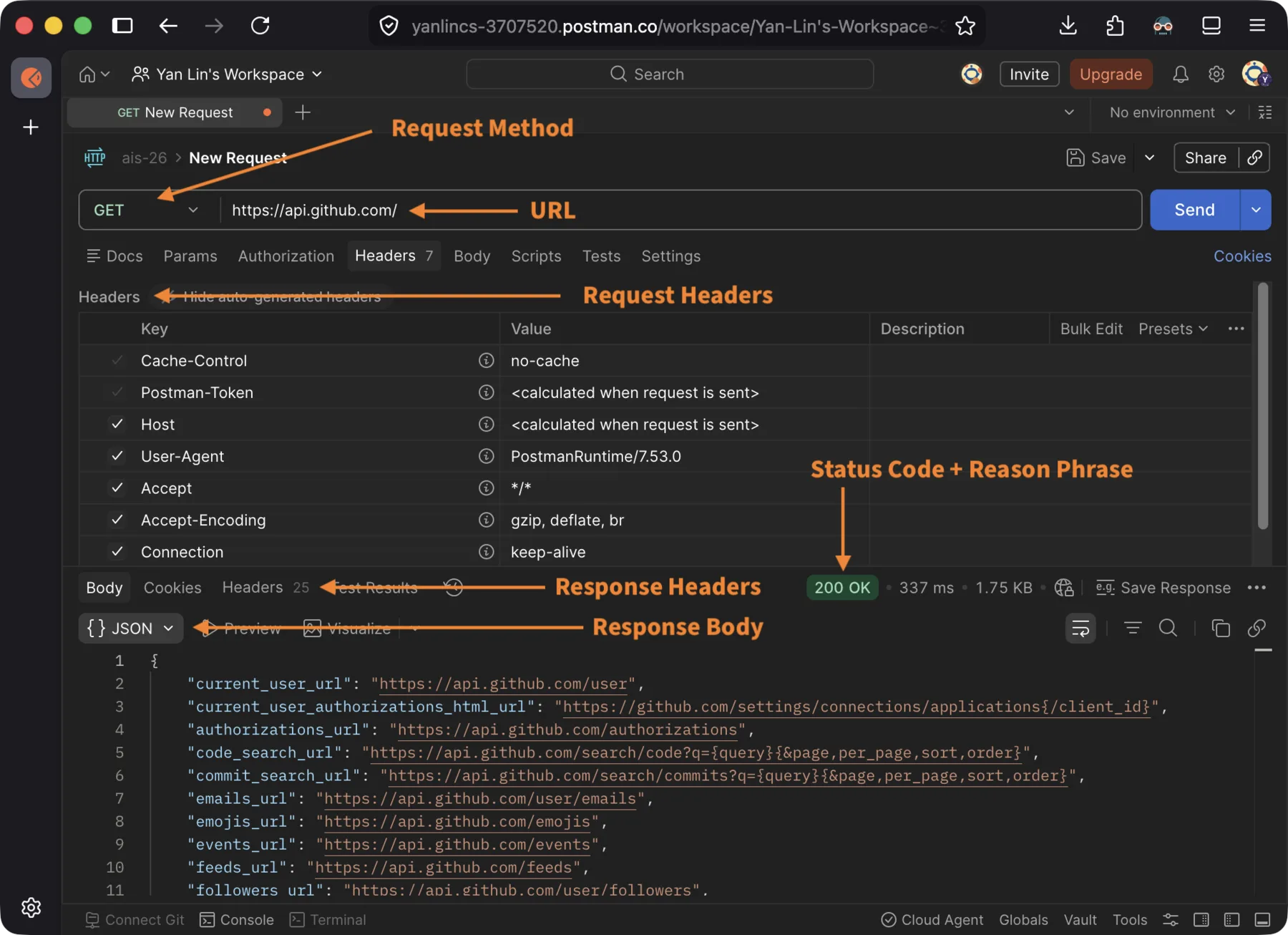
Request and response components view in Postman's interface.
Even better, Postman allows us to control all the components in an HTTP request, which allows us to test more advanced APIs, like those that accept POST requests and require API key authentication.
I will use OpenAI's chat API (https://api.openai.com/v1/responses) as an example here.
Following OpenAI's official documentation for their chat API, we use Postman to send a request with the following request line and mandatory request headers:
POST https://api.openai.com/v1/responses HTTP/1.1

Authorization: Bearer <your-openai-api-key-here>
Content-Type: application/json
We also include the request body containing our question to the AI model. Then we receive the response from the API, which includes the haiku that we told the AI to write, among other data.
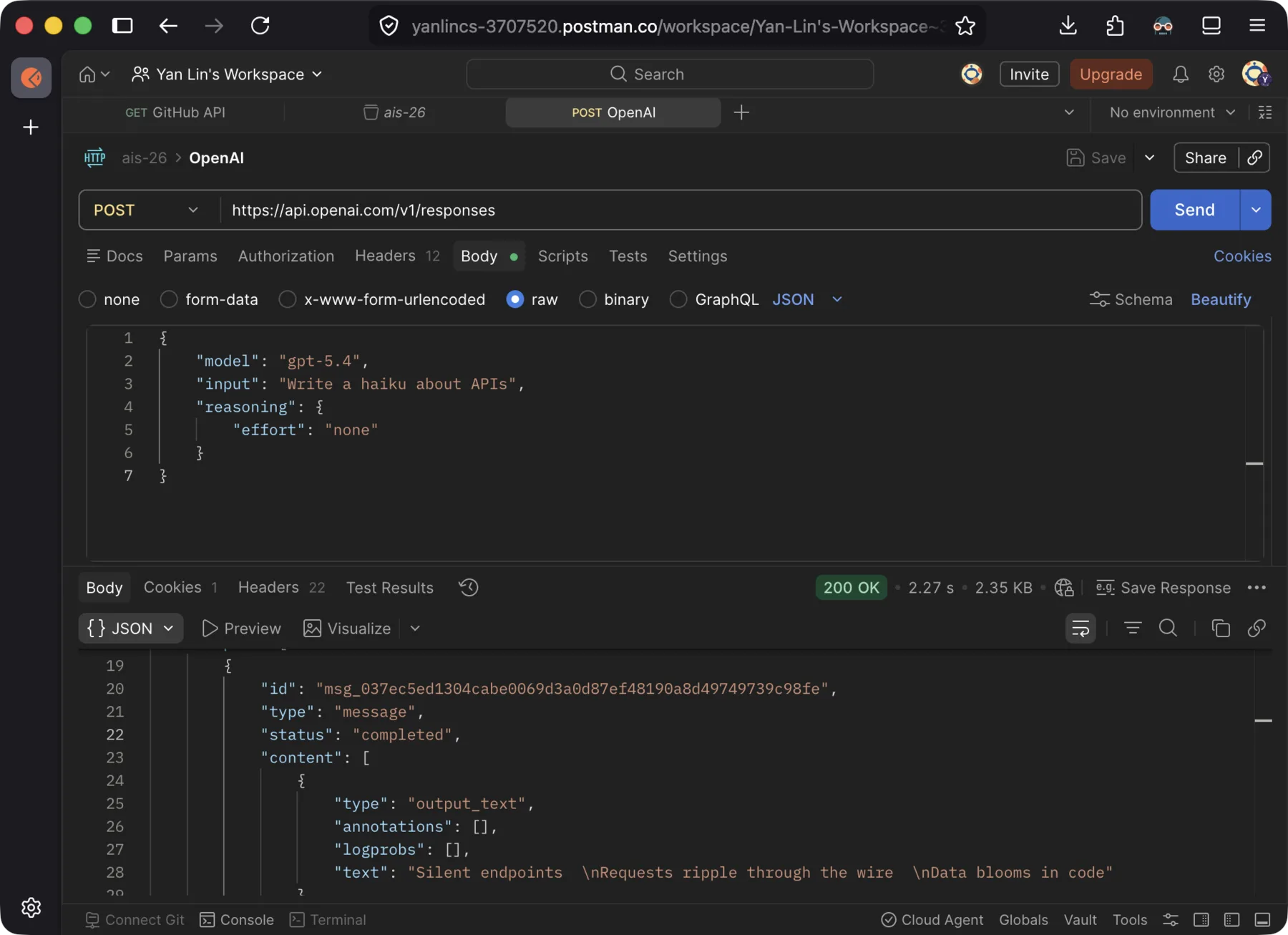
Request body sent to and response body received from OpenAI's chat API.
You can easily test and play with all kinds of APIs to interact with existing AI systems following the above method. Before you start playing with APIs yourself, there are two practical prerequisites to look out for.
First, different APIs usually have vastly different specifications for mandatory request headers and the format of the request body. So it is a good idea to first check the documentation of the family of APIs you are going to interact with. If you want to interact with APIs served by Google, OpenAI, or Anthropic, you can find their API documentation in Google Gemini API Doc, OpenAI API Platform, and Claude API Docs, respectively.
Second, when sending requests to APIs for AI systems served by most of the big AI companies, you are expected to register an account under their developer platforms, and identify yourself with an API key when sending HTTP requests. This topic is also covered in the above documentation. Since AI systems cost these companies a lot of money to run, you might be charged to use their APIs, and they might reject your requests if you don't have any quota left. Many platforms will give you a small amount of free quota to play with if you are a newly registered user. Google is also relatively generous with their free quota. As of this writing, you can use some of their lighter models completely free as stated in their pricing policy (with limits or asterisks, of course).
Here are some text and video tutorials for Postman if you want to learn it more systematically.
- Postman tutorial (blog post) by GeeksforGeeks, a comprehensive guide spanning from basics to advanced features
- Postman API Testing Tutorial for beginners (video) by Codemify, a hands-on walkthrough for first-time users
Here are some alternative API testing tools to Postman, if you do not enjoy Postman for any reason.
- curl, the classic Unix command line program that can be used to test APIs
- httpie, an open-source, modern command line API testing tool
- Other open-source API testing tools that are either web-based or desktop client-based: Hoppscotch, Bruno, and Insomnia
Exercise: Interact with APIs of AI Chatbots
While you probably have interacted with AI chatbots through their handy GUI applications like phone apps or web interfaces, in this exercise we want to get a better idea of what's actually happening internally by directly interacting with the APIs of those AI chatbots, using the API testing tool of your choice.
Before you start, make sure you have the following ready:
- Register a developer account under the AI platform of your choice. As discussed, Google with their Gemini platform might be the better choice, since some of their lighter models can be used free of charge.
- An API key obtained from that platform.
- An API testing tool set up and ready to use, such as Postman.
Start by reading the API documentation of your chosen provider, and figure out how to construct a POST request that sends a chat message to one of their AI models. Pay attention to the URL, the required request headers, where to place your API key, and the expected format of the request body.
Send the request, and if everything goes well, you should receive a response with a 200 OK status line. Take a moment to look through the response body and try to locate the AI model's reply, as well as any metadata the API provides alongside it.
If you receive an error instead, take a look at the status code and the response body, as they will often give you a hint of what went wrong and how to fix it. The API documentation of your chosen provider usually also has information on common error codes and their causes.
Pro tip: Nowadays, most AI API documentation shows examples using the provider's official Python package by default, which hides the underlying HTTP details. To bypass that, look for a programming language selector near the code examples and switch to
curl. You can then extract the HTTP request specification from these examples as long as you know how to readcurlcommands.
Now that you have a working request, try the following experiments and observe what happens:
- Replace your prompt with a different question or instruction. Does the response structure stay the same, or does only the content change?
- Replace your API key with something like
invalid-keyand send the request again. What status code do you get? What does the response body say? - Remove a required field or send a malformed JSON object. What does the error response look like?
These experiments should give you a sense of how APIs communicate success and failure through HTTP status codes and response bodies, and how the same API can behave differently depending on the input it receives.