API Server Fundamentals
So far we have been API consumers. We pointed our browsers, testing tools, and Python scripts at APIs that someone else wrote and someone else ran for us, and we got back answers. That is convenient, but it also means we are paying someone else's bills, playing by their rules, and waiting for their AI models to do the work. In this module we flip the role and become API producers, building our own API server that other programs can talk to.
The publicly accessible APIs we played with in the previous two modules are not magic. They are served by a kind of program called an API server, which sits at some address on the network, listens for incoming HTTP requests, decides what to do with each one, and sends back an HTTP response. The provider runs the API server on their own hardware, exposes it under a domain name, and the rest of the world reaches it over HTTP. We can do exactly the same thing on our own machine, just at a smaller scale.
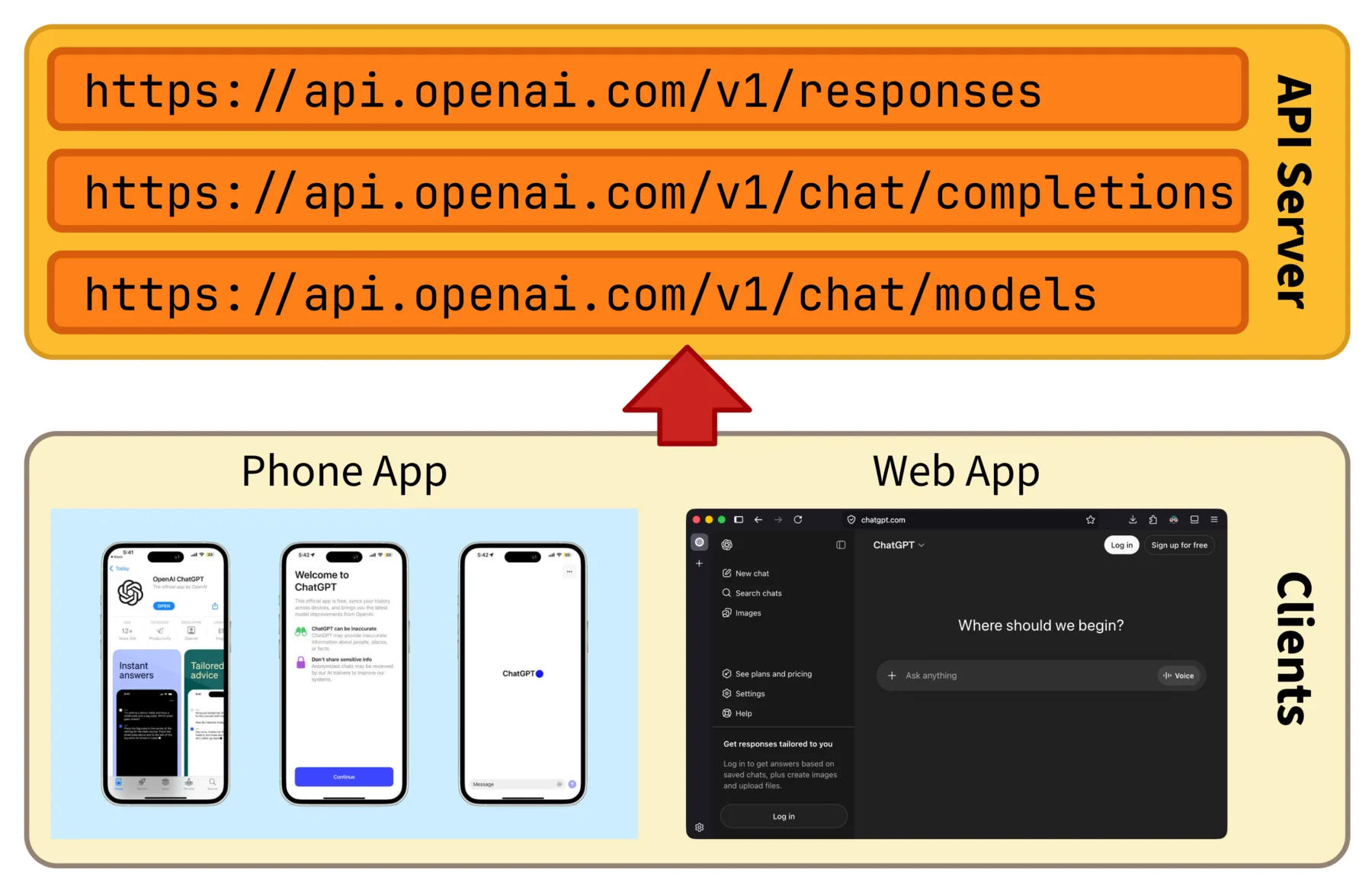
OpenAI's API server exposes many endpoints under the same domain, and various clients like the ChatGPT phone and web apps reach them over HTTP.
In this module we will build a small API server with FastAPI, one of the most popular Python frameworks for writing APIs.
We will start from a hello-world server, then walk through how to define GET and POST endpoints, how to validate incoming data, and how to format the response, including the streaming responses we received as a client in the previous module.
Getting Started with FastAPI
Just as the requests package saved us from writing raw HTTP on the client side, an API server framework saves us from writing raw HTTP on the server side.
Without one, we would have to open a TCP socket, parse incoming bytes into HTTP requests by hand, route them to our own functions, and serialize the results back into HTTP responses.
None of that is the part of building an AI system that we actually care about.
A framework takes care of all those plumbing concerns and lets us focus on what each endpoint should do.
FastAPI is a modern Python framework for building APIs. It is widely used in AI projects for a few reasons. A working server fits in just a few lines, so it is easy to start with. It uses Python type hints to validate incoming data and generate documentation automatically, which saves a lot of repetitive code. And it has built-in support for asynchronous programming, which becomes useful once we start serving AI models that take seconds to respond. We will come back to the asynchronous part in Module A.4, and stick to the basics for now.
To install FastAPI together with the tools needed to run it, in a terminal run:
pip install "fastapi[standard]"The [standard] part also installs Uvicorn, a small program that actually opens the network port and runs our FastAPI app.
FastAPI itself only describes what the server does, while Uvicorn is the runtime that makes it listen for real requests on a real port.
A minimal FastAPI server looks like this:
# main.py
from fastapi import FastAPI

app = FastAPI(title="My API Server", version="1.0.0")

@app.get("/")
def read_root():
    return {"message": "Welcome to my API server!"}
We create a FastAPI instance called app, and attach a function to the root URL / using the @app.get decorator.
Whenever a GET request comes in for /, FastAPI calls read_root and turns the returned dictionary into a JSON response.
To start the server, run from the same folder:
fastapi dev main.pyfastapi dev looks for the app object in main.py, starts Uvicorn behind the scenes, and enables auto-reload so the server restarts whenever we edit the file.
The terminal will print something like:
INFO:     Uvicorn running on http://127.0.0.1:8000 (Press CTRL+C to quit)
INFO:     Started reloader process [52851] using StatReload
INFO:     Started server process [52853]
INFO:     Application startup complete.
Recall from Module A.1 that 127.0.0.1 is the loopback IP address, meaning the server only accepts requests from the same machine, and 8000 is the port the server listens on.
Now if we open http://127.0.0.1:8000 in a browser or send a GET request to it from the Python program we built in Module A.2, we should see the welcome message come back.
The server will also log every request it handles, which is handy for debugging:
INFO: 127.0.0.1:56835 - "GET / HTTP/1.1" 200 OKThe line tells us a client at 127.0.0.1:56835 sent a GET / HTTP/1.1 request, and the server responded with 200 OK.
Below are some additional resources to help you get more comfortable with FastAPI.
- The official FastAPI tutorial (docs), the most thorough reference
- Real Python's walkthrough of a FastAPI example app (blog post), a guided tour of building a small API
- FastAPI tutorial in 15 minutes (video), a quick hands-on overview
- FastAPI course for beginners (video), a longer free course covering more features
FastAPI is not the only choice for building API servers in Python. Two other widely used Python frameworks are Flask and Django. Flask is a lightweight, minimal framework that has been a community favorite for years, while Django is a much larger framework aimed at full websites with built-in templates, admin panels, and database tools. FastAPI is the youngest of the three but has grown rapidly thanks to its validation driven by type hints and its async support, both of which fit AI workloads well.
Outside the Python world, every popular language has at least one mature API server framework, for example Express for Node.js, Gin for Go, and Axum for Rust. The way they work is the same across all of them, so once you understand FastAPI, picking up another framework is mostly a matter of learning a new syntax.
Creating GET Endpoints
A real API usually has more than one endpoint.
OpenAI's API alone has dozens of them under the same domain, like /v1/models and /v1/chat/completions.
Each one corresponds to a different action.
In FastAPI, each endpoint is a Python function decorated with the HTTP method we want to support and the path we want to expose.
We will start with GET endpoints, then introduce a few patterns we typically need: reading request headers, versioning, and parameterizing URLs.
Basics
Adding more GET endpoints is just a matter of adding more decorated functions.
For example, in main.py we add another route:
@app.get("/secret")
def get_secret():
    return {"message": "You found my secret!"}
A GET request to http://127.0.0.1:8000/secret now returns the new message, while / still returns the original welcome message.
The function name is up to us. FastAPI only cares about the decorator and the path.
Reading Request Headers
Sometimes an endpoint needs to look at the request headers, for example to figure out who is calling.
Recall from Module A.1 that headers are key-value pairs sent alongside the request, like Authorization for an API key or User-Agent for the client name.
FastAPI exposes them through the Header dependency:
from fastapi import Header

@app.get("/whoami")
def whoami(user_agent: str | None = Header(default=None)):
    return {"user_agent": user_agent}
The parameter name user_agent is automatically mapped to the User-Agent header. FastAPI converts underscores to dashes and ignores letter case.
If the header is missing, the default value None is used.
If we send a GET request to http://127.0.0.1:8000/whoami from a browser, we will see the browser's User-Agent string in the response.
Sending the same request from our Python program in Module A.2 will instead show whatever User-Agent we set in the requests headers.
API Versioning
Once an API is in use, changing the response format is risky.
Existing clients might still expect the old format, and shipping a breaking change overnight will quietly break their software.
A common solution is API versioning, where we keep the old version running while the new version lives at a different path.
Clients can switch to the new version when they are ready, instead of being forced to migrate immediately.
This is exactly what providers like OpenAI do with the /v1/ prefix on their endpoints.
FastAPI provides APIRouter for grouping endpoints under a shared prefix:
from fastapi import APIRouter

v1_router = APIRouter(prefix="/v1")
v2_router = APIRouter(prefix="/v2")

@v1_router.get("/secret")
def get_secret_v1():
    return {"message": "You found my secret!"}

@v2_router.get("/secret")
def get_secret_v2():
    return {"message": "You found my secret!", "version": "2.0"}

app.include_router(v1_router)
app.include_router(v2_router)
Now GET /v1/secret returns the original response, while GET /v2/secret returns the new format with an extra version field.
Old clients can keep hitting /v1/secret and remain functional. New clients that want the extra information can switch to /v2/secret whenever they are ready.
URL Templates
Some endpoints need to take parameters from the URL itself.
For example, on YouTube each channel has its own URL like https://www.youtube.com/@FoldingIdeas, and we obviously do not want to write a separate function for every channel.
The first way to handle this is through URL templates, where parts of the path are placeholders that get filled in by each request. In FastAPI we mark a placeholder with curly braces, and the matching value is passed into our function as an argument:
@app.get("/parrot/{message}")
def repeat(message: str):
    return {"message": message}
A request to http://127.0.0.1:8000/parrot/hello returns {"message": "hello"}.
The type hint message: str tells FastAPI to keep the value as a string.
If we change it to message: int, FastAPI will automatically reject any request whose path part is not a valid integer, returning a 422 Unprocessable Entity response.
Multiple templates and fixed segments can be mixed in the same path:
@app.get("/users/{user_id}/messages/{message_id}")
def get_message(user_id: int, message_id: int):
    return {"user_id": user_id, "message_id": message_id}
The second way is through URL query parameters, which are written after a ? at the end of the URL as key=value pairs separated by &, like ?user=2&limit=10.
In FastAPI, any function argument that is not part of the path template is automatically treated as a query parameter:
@app.get("/secret")
def get_secret(user: int = 0):
    return {"message": f"User {user} found my secret!"}
A request to http://127.0.0.1:8000/secret?user=2 returns {"message": "User 2 found my secret!"}.
We can mix the two approaches in the same endpoint, and FastAPI will figure out which arguments come from the path and which come from the query string.
Creating POST Endpoints
GET endpoints are great for reading data, but as soon as we want clients to send us something more substantial than a few URL parameters, we move to POST.
Recall from Module A.1 that a POST request carries a request body, which is where we expect the bulk of the data to live.
This is also the method most AI APIs use for actual inference calls, since the prompt, the image, or whatever else we want the model to process all has to travel inside the body.
Reading the Request Body
The simplest way to read a JSON body is to declare a parameter with type dict:
@app.post("/echo")
def echo(data: dict):
    return {"received": data}
FastAPI parses the JSON body and hands it to our function as a Python dictionary.
Sending {"name": "Alice", "age": 30} to /echo returns {"received": {"name": "Alice", "age": 30}}.
This is convenient but fragile. Nothing stops a client from sending a body with a missing field, an extra field, or the wrong type for an existing field. Our endpoint will happily accept all of them, and the bug will only surface later, deep inside the function, when we try to use a value that does not look the way we assumed.
Validating the Body with Pydantic
The fix is to describe the expected shape of the body up front and let the framework reject anything that does not match. FastAPI does this through Pydantic, a data validation library that lets us declare a class with typed fields and automatically check incoming data against it.
Suppose we want clients to send a body like:
{
    "user": 20,
    "message": "This is a very secret message!",
    "date": "2026-07-30"
}
We define a Pydantic model that captures the expected fields and types, and use it as the parameter type:
from pydantic import BaseModel

class SecretMessage(BaseModel):
    user: int
    message: str
    date: str

@app.post("/receiver")
def receiver(data: SecretMessage):
    return {
        "message": f"User {data.user} sent a secret '{data.message}' on {data.date}.",
    }
Inside the function we can access the fields as regular attributes (data.user, data.message, data.date).
If a client sends a body with user as a string, an extra unknown field, or a missing required field, FastAPI rejects the request with a 422 Unprocessable Entity response and a JSON body explaining exactly which field is wrong, all before our function is even called.
Pydantic supports nested models, lists, optional fields, default values, and a long list of constraints (minimum length, regex pattern, numeric range, and so on). You can refer to the Pydantic documentation once you need anything beyond the basics.
Below are some additional resources for learning Pydantic more systematically.
- Real Python's tutorial on Pydantic (blog post), with hands-on examples of validation rules, custom validators, and settings management
- Pydantic tutorial (video) by ArjanCodes, walking through the most common patterns
- Why Python needs Pydantic for real applications (video), a shorter take focused on motivation
Receiving Images
Most of the JSON examples above carry plain text and numbers. But many AI APIs also need to accept images, audio, or other binary data. We saw on the client side in Module A.2 that the typical workaround is to encode the image as a Base64 string, since JSON cannot directly hold raw bytes.
The server side mirrors that. We accept a Base64 string in the request body, and decode it back into bytes before processing:
import base64
from io import BytesIO
from PIL import Image
from fastapi import HTTPException
from pydantic import BaseModel

class ImageRequest(BaseModel):
    image: str  # Base64-encoded image bytes

@app.post("/inspect")
def inspect(req: ImageRequest):
    try:
        # If the client sent a data URL, strip the "data:image/...;base64," prefix
        encoded = req.image.split(",", 1)[1] if req.image.startswith("data:") else req.image
        image_bytes = base64.b64decode(encoded)
        image = Image.open(BytesIO(image_bytes))
    except Exception as e:
        raise HTTPException(status_code=400, detail=f"Invalid image: {e}")

    return {"format": image.format, "size": image.size, "mode": image.mode}
Here we use Pillow to open the decoded bytes as an image, then return some basic metadata so the client can tell the request worked.
HTTPException is FastAPI's built-in helper for returning an error status code with a custom message. Here we return 400 Bad Request if the body cannot be decoded as a valid image.
Base64 in a JSON body is the most common pattern for sending images to AI APIs, but it is not the only one. An alternative is multipart form upload, which sends the file as raw bytes alongside other form fields. It avoids the overhead of Base64 encoding (which inflates the size by about 33%), but the request body is no longer a clean JSON object, and many AI providers do not accept this format. For our purposes Base64 in JSON is the simpler option.
Sending Back HTTP Responses
For all the endpoints we have written so far, we just returned a Python dictionary and let FastAPI handle the rest. That is the right default and works for the majority of endpoints. However, sometimes we want to control the response more directly, for example to set a custom status code, attach extra headers, or stream the body in pieces.
Customizing Status Code, Headers, and Body
To customize a response, we can return a Response object.
The most common one is JSONResponse, which is what FastAPI uses internally when we just return a dictionary:
from fastapi.responses import JSONResponse

@app.post("/items")
def create_item(item: dict):
    return JSONResponse(
        content={"created": item},
        status_code=201,
        headers={"X-Server-Note": "thanks for the order"},
    )
This response carries 201 Created as the status code instead of the default 200 OK, and adds a custom X-Server-Note header alongside the regular ones.
A client reading the response can then look at the status line and headers to learn more about what just happened.
For shorthand, FastAPI also lets us declare a default status code on the decorator:
@app.post("/items", status_code=201)
def create_item(item: dict):
    return {"created": item}
This achieves the same status code without spelling out a JSONResponse.
Streaming Responses with SSE
In Module A.2, we received streaming responses from AI APIs using Server-Sent Events. Now we are on the other side of the wire, so we have to actually emit those events.
Streaming a response in FastAPI means handing back a generator instead of a finished value.
Each yield from the generator becomes a chunk that the framework sends to the client immediately, without waiting for the rest.
We use StreamingResponse to wrap the generator and set the right Content-Type:
import time
from fastapi.responses import StreamingResponse

def fake_token_stream():
    for word in ["Hello", "from", "my", "streaming", "API"]:
        # Each SSE event is "data: <payload>\n\n", same format we parsed in A.2
        yield f"data: {word}\n\n"
        time.sleep(0.3)
    yield "data: [DONE]\n\n"

@app.get("/stream")
def stream():
    return StreamingResponse(fake_token_stream(), media_type="text/event-stream")
Each yield follows the SSE format we already saw on the client side: a line starting with data: followed by the payload, ending with a blank line.
The client we wrote in the previous module can connect to this endpoint with stream=True, read the lines as they arrive, and print each word as it appears, just like with a real AI API.
The final data: [DONE] line is the same convention OpenAI uses to signal the stream is finished, and our previous client already knows how to handle it.
media_type="text/event-stream" tells the client (and any proxies in between) that this response is an SSE stream rather than a regular JSON document.
Without it, the response would still work, but some clients and proxies might buffer the body and defeat the streaming behavior.
Exercise: Your First API Server
Build a small FastAPI server that demonstrates the patterns covered in this module, then route the Module A.2 program at it instead of a third-party AI API.
The server does not need to do any real AI work yet. For now, every endpoint can return hardcoded responses. We will plug in actual AI models in Module A.4.
A reasonable starting point:
- Set up a new Python project, install FastAPI with
pip install "fastapi[standard]", and create amain.pywith aFastAPIinstance. - Add a versioned
GETendpoint at/v1/hellothat returns a hardcoded greeting message. - Add a versioned
POSTendpoint at/v1/chatthat accepts a JSON body with at least amessagefield, and returns a hardcoded reply that echoes the message back. - Run the server with
fastapi dev main.py, and update your Module A.2 program to point athttp://127.0.0.1:8000/v1/chatinstead of OpenAI or another provider.
Once that works, try the following extensions to deepen your understanding of the topics covered in this module:
- Define the request body of
/v1/chatas a Pydantic model. Then send a malformed body from your client, for example with themessagefield missing or replaced by an integer, and read the422response that comes back. - Add a streaming endpoint at
/v1/chat/streamthat emits a hardcoded reply word by word as SSE events. Update your Module A.2 streaming code to consume this endpoint, and verify that the words show up one at a time on the client side. - Add an endpoint that accepts a Base64-encoded image and returns its dimensions and format. Send a real image from the Module A.2 program and check that the server reports the correct values.
If you finish all the extensions, you will have a small but real API server that mirrors the shape of the production AI APIs we have been talking to all along. The next module fills in what is still missing, the AI model behind the endpoints.